Our Teen Community Service programs for March are fully booked. Please click here to learn about additional resources.

Show your current ADULT Deer Park Public Library Card at the Circulation Desk to purchase discounted tickets and receive discount codes to local attractions (while supplies last)! If you have questions, please contact the Circulation Department at (631) 586-3000 ext. 0. In addition, the library also has museum passes that you may reserve online here with an adult DPPL card. Contact the Children’s Department at (631) 586-3000 ext. 3 for more information. Pricing and availability subject to change. Library Price: $39.00 per ticket Regular Price: $59.00 child (7-13y) / $69.00 adultLimit: 6 per adult DPPL cardholderExpiration: none *SOLD OUT FOR THE SEASON* Library Price: $31.50 per ticket Regular Price: $49.50 general (2-24y) / $39.50 adultLimit: 6 per adult DPPL cardholderExpiration: Valid from June 1 – October 5, 2025 Library Price: $10.00 per ticket (includes general admission plus 1 ticketed exhibition)Regular Price: $17.00 child (3-12y) / $30.00 adult (13-59y) / $24.00 senior (60y+)Limit: 6 per adult DPPL cardholderExpiration: see ticket for date Library Price: $28.00 per child or senior ticket / $39.00 per adult ticketRegular Price: $35.99 child (3-12y) / $50.99 adult (13-61y) / $36.99 senior (62y+)Limit: 6 per adult DPPL cardholderExpiration: none

Wireless & Remote Printing

Print from ANYWHERE with

You can use your personal computer or mobile device to print to the library’s printers from anywhere.
Simply submit your documents for printing and come to the library to release and retrieve them.

This printing service is only available during library hours. Same-day pickups only for all prints.

  • Color Copies: .25¢/page
  • Black & White: .10¢/page

To Print Documents/Photos

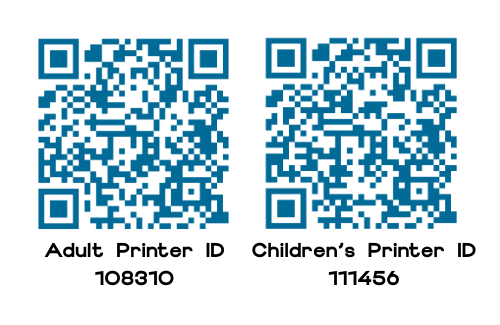
  1. Scan the QR code with your device’s camera OR go to print.princh.com and enter the printer ID.
  2. Upload your document(s) and adjust your print settings.
  3. Go to the department of the printer you chose to pay for and retrieve your print job(s).

To Print Emails/Webpages
*You must download the Princh app*
for iOS

  1. Tap the Share button.
  2. Tap on Print (not Print with Princh).
  3. Check the page view to see what is selected to print as it could be more pages than you might want. Deselect any pages you don’t wish to print.
  4. Tap the Share button.
  5. Tap the Princh app.
  6. Enter printer ID or scan QR code. Follow prompts to complete your print job.

for Android

  1. Tap the Share button.
  2. Tap on Print.
  3. Check the print preview to see what is selected to print as it could be more pages than you might want. Deselect any pages you don’t wish to print.
  4. Tap the printer button.
  5. Enter printer ID or scan QR code. Follow prompts to complete your print job.
It's MondayThe library is open
Monday - Thursday9:00 AM — 9:00 PM
Friday9:00 AM — 6:00 PM
Saturday9:00 AM — 5:00 PM
Sunday12:00 PM — 4:00 PM
  • Mon. - Thurs. 9:00 AM - 9:00 PM
  • Friday 9:00 AM - 6:00 PM
  • Saturday 9:00 AM - 5:00 PM
  • Sunday 12:00 PM - 4:00 PM

    November - April

Search Our Website

Search Deer Park Catalog

Search Suffolk County